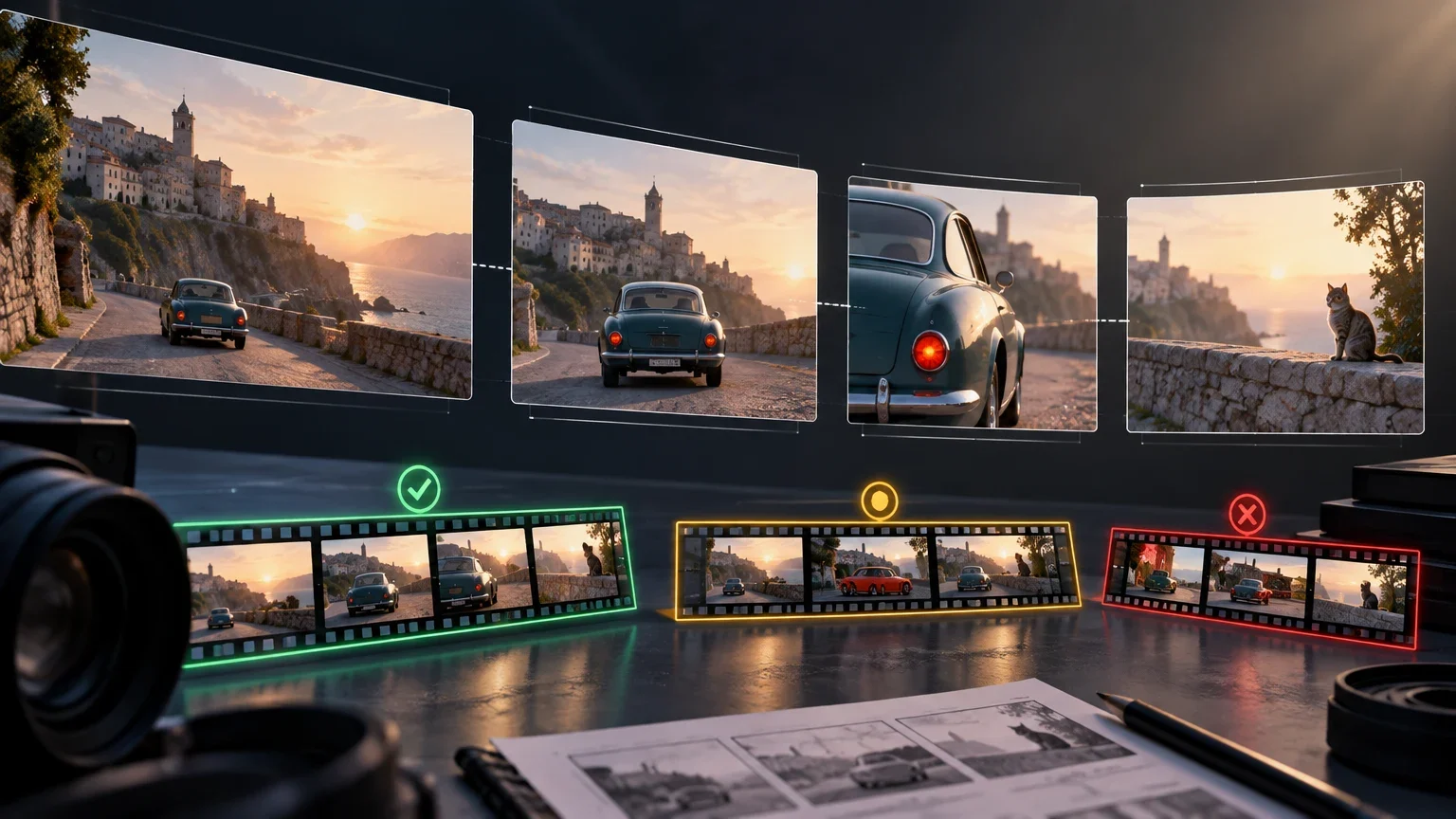
The unit of evaluation is not the isolated clip, but the editable sequence
Generative-video evaluation often begins with a question that is too limited: whether a short shot looks realistic or appealing. That observation can be useful when exploring a tool, but it does not prove that the material can enter a production. In an edit, a shot must relate to the shot before it and the shot after it: a person must retain the relevant attributes, a product must keep its form and brand elements, an action must end in a position compatible with the next framing, and the space must remain understandable to the audience.
Continuity does not mean that nothing changes. A sequence can move from a wide shot to a close-up, alter lighting as a narrative choice, or show an object from another angle. What matters is that changes are intentional, defined before generation, and do not contradict the information the edit needs to preserve. A wardrobe change may be valid if it is presented as a time jump; it is a defect if it happens between two shots that represent the same moment.
For that reason, the team should replace the question “Is this clip good?” with more operational questions: “Can it cut to the previous shot?”, “Does it preserve the agreed attributes?”, “Does its final state allow the action to continue?”, and “Do we know how it was produced and what was changed afterward?” The answer should be based on a set of shots and repeatable criteria, not on a manually selected demonstration.
Academic evaluation frameworks for generative video distinguish dimensions such as temporal consistency of subject and background, flicker, motion smoothness, human action, spatial relationships, and alignment with the requested condition. That separation is useful in production because it prevents a serious continuity failure from being offset by an overall impression of visual quality. A clip may have excellent lighting and still fail if an object changes sides, text ceases to be correct, or a hand ends an action in a position that cannot be connected.
Define the continuity contract before writing prompts
Before generating, write a sequence contract: a short list of attributes, states, and tolerances that the team can verify. There should be one version for each scene or shot family, accessible to creative direction, editing, production, and the people operating the tool. It is not a generic aesthetic document; it is a specification of what must remain stable and what may vary.
Separate attributes into three groups. Invariants cannot change within the defined sequence: for example, a visible logo, the color of a bottle, the length and color of a garment, legal text, the hand holding an object, or the position of a door. Controlled attributes may change within limits: framing, apparent focal length, light intensity, depth of field, or camera speed. Free attributes are details with no editorial impact, such as secondary background elements, provided that they do not introduce brand, safety, or contextual conflicts.
Also include a narrative input and output state. For each shot, describe what happens just before its first usable frame and what must be true in its last usable frame. In a product demonstration, the input state might be “closed package on the table, front label legible,” and the output state might be “package open, cap in the right hand, product still centered.” This makes it possible to check whether the next shot receives a compatible situation instead of trying to hide the jump during editing.
The contract should state the tolerance allowed for every requirement. Tolerance is not the same for a background texture as it is for a price, a safety figure, on-screen text, or a regulated mark. When a requirement allows no deviation, classify it as binary: it passes or is rejected. When it permits variation, define how it will be reviewed, for example through visual comparison at delivery size and frame-by-frame review at edit points.
Initial attribute and tolerance matrix
| Attribute | Classification | Acceptance criterion | Verification |
|---|---|---|---|
| Character identity | Invariant | Defined features, hairstyle, and wardrobe remain consistent in linked shots | Comparison with the reference and across edit points |
| Product and brand | Invariant | Shape, color, label, and mandatory elements do not change | Magnified review of relevant frames |
| Text and figures | Invariant | Legible and correct wherever they must be read | Review at delivery size |
| Position and action | Controlled | The shot begins and ends in the requested state | Review of the first and last usable frame |
| Camera and lighting | Controlled | Changes are consistent with the stated intent | Review of the edited sequence |
| Secondary background | Free with limits | Does not create contradictions or material distractions | Editorial review |
Separate the tests that are often confused
Continuity within a shot evaluates the temporal stability of a single clip. Check whether the subject, product, background, and geometry remain stable while there is movement; whether flicker appears; whether a hand, edge, or text deforms; and whether the action progresses in an understandable way. This test is necessary, but it does not show that two clips can coexist in an edit.
Continuity between shots evaluates the relationship between different clips. Compare the last usable state of one shot with the first usable state of the next: gaze direction, side of the object, body orientation, liquid level, hand positions, lighting, continuity of the set, and direction of movement. Do this both in the shot list and in a real timeline. Some errors are only detected when the cut is played at final speed.
Variant control measures another capability: producing alternatives of the same shot without losing its requirements. It matters when production needs to adapt duration, aspect ratio, framing, language, call to action, or pacing. A model may achieve one favorable generation and still deliver a usable-variant rate that is too low for a deadline-driven workflow.
Do not merge the outcomes of these tests into one aesthetic score. Keep separate indicators. If a tool preserves a character well within a shot but fails to connect action states, the diagnosis differs from that of a tool that links positions but does not preserve text. The decision to use it will depend on each scene’s needs and on the team’s ability to correct the defect.
Build a visual bible and a state sheet
The visual bible gathers the assets and decisions that shape the appearance of the sequence. It may contain authorized images of characters, product, wardrobe, location, palette, composition, typography, and camera references. Each asset should have an internal identifier, a specific purpose, and the available information about authorization for use. A reference should not be described as though it guarantees an outcome: its usefulness must be verified in the team’s tests.
Some platforms allow generation to be conditioned by image references, and their documentation presents this mechanism as a way to guide preservation of a character’s visual identity across scenes. This can help standardize test inputs, but it does not replace validation. A reference may reduce variation in certain cases and still be insufficient for text, product geometry, complex actions, or demanding edit points.
The state sheet complements the visual bible. It records, shot by shot, the elements that appear, their positions, the action underway, camera orientation, and the input and output states. Add a dependency column: indicate which prior or later shot requires that attribute to be retained. This relationship makes it possible to prioritize controls: a detail that never reappears may need less scrutiny than an object that connects four shots.
Avoid building the bible around ambiguous phrases such as “same person” or “premium look.” Translate those intentions into observables. Instead of “identical product,” state apparent dimensions, color, visible face of the label, cap, number of elements, and essential text. Instead of “cinematic movement,” specify whether the camera pushes in, pulls back, pans, or remains static, and what the subject’s dominant direction must be.
Process for preparing the visual bible and state sheet
- 01List the shots and determine which continuity relationships exist among them.
- 02Identify invariant, controlled, and free attributes for every relationship.
- 03Gather only reference assets that the team is authorized to use and assign each one an internal identifier.
- 04Describe the input and output state of every shot using verifiable terms.
- 05Define tolerances and the people responsible for approving each error category.
- 06Freeze the version of the bible used in the test so later results can be compared.
Design a test set that resembles real work
A useful test must include the types of shots the organization expects to produce. Limiting it to static portraits or landscapes can conceal the failures that will appear in advertising, training, demonstrations, or editorial content. Design a short sequence, but with enough variety to stress the relevant requirements.
At a minimum, include an establishing shot to set space and direction; a medium shot or close-up to examine identity; an object-handling action; a shot containing text or figures that must be correct; a camera movement; a cut between shot scales; and, if the workflow includes it, a shot extension. Where the product or scene requires it, add reflections, transparency, hands, crowds, physical interaction, or lighting changes. Not all teams need the same tests: the selection should respond to the production’s editorial and operational risks.
Run more than one generation for each condition when the tool and budget allow it. One favorable output does not reveal the system’s variability. Record how many attempts were made, how many reached review, and how many were approved without altering material requirements. Distinguish the raw result from the output ultimately used: a shot may be publishable after retouching, but it should not be counted as approved without intervention.
When a tool offers controls such as first and last images, duration, aspect ratio, resolution, seed, or number of outputs, note which ones were used. Documentation for a platform that generates from first and last frames exposes several such parameters. In production, recording them makes it possible to repeat tests, investigate differences, and check whether the generated final state satisfies the requested edit point. The existence of a control does not by itself prove that the result is consistent.
Minimum sequence set for an initial evaluation
| Test | Risk explored | Result under review |
|---|---|---|
| Establishing shot and cut to character | Spatial and lighting drift | Compatible direction, location, and appearance |
| Product handling | Changes in form, hand, or orientation | Object and action can be linked |
| On-screen text | Incorrect or illegible text | Correct reading in the defined frames |
| Camera movement | Instability and temporal deformation | Understandable path without material artifacts |
| Transition shot | Jump in action or position | Compatible output and input states |
| Format or duration variant | Loss of control when adapting the shot | Critical requirements are retained |
Measure results without hiding the cost of correction
Measure the usable-shot rate, but first define what “usable” means. A practical classification is: approved without material correction; approved with permitted correction; not approved. Permitted corrections should be agreed before the test. For example, duration trimming or stabilization that does not change content may be authorized; by contrast, replacing a logo, rebuilding a hand, or rewriting text may turn the clip into material requiring significant intervention.
Record incidents by type and severity. Common types include identity drift, product alteration, incorrect text, action reversal, spatial discontinuity, temporal flicker, unrequested camera movement, and conflict between the final state of one shot and the first state of the next. Severity should reflect impact: a background discrepancy may be tolerable; illegible legal text or an incorrect product label will likely require rejection.
Also calculate the cost per finally approved second, not just the cost per generation. Include, where applicable, generation, selection, review, editing, retouching, regeneration, and replacement with conventional footage. This measure does not require every shot to have the same cost, but it prevents a tool from appearing efficient if it produces many outputs that need later work.
Use blind selection where feasible: reviewers can assess versions without knowing the specific model or configuration. This reduces the influence of expectations, although it does not eliminate editorial judgment. Keep both decisions and their rationale. Metrics support the decision; they do not replace human review of context, brand suitability, and applicable obligations.
Apply a generation, editing, and traceability protocol
Every output should be linkable to its production context. For every candidate shot, record at least: project and scene identifier, tool, model and version as declared by the tool when available, generation date, selected configuration, prompts used, reference assets, requested input and output state, operator, review outcome, and subsequent transformations. If a data point is unavailable, record it as unavailable; do not fill it in by inference.
Traceability is different from continuity, but both are necessary. Without a record, the team cannot explain why two versions differ, regenerate an output under comparable conditions, or determine which asset influenced a result. Without continuity control, a detailed record merely documents material that may not be editable.
The C2PA specification contemplates assertions about actions performed, ingredients or incorporated assets, and composition relationships or inputs to AI or machine-learning processes. It can be a useful mechanism for exchanging provenance information when tools support it. However, it should not be assumed to replace the internal record: it may not contain all prompts, parameters, versions, authorizations, editing decisions, or rights evidence that an organization needs to retain.
In the edit, lock the highest-risk edit points first: action changes, product close-ups, text, hand gestures, and spatial transitions. Review the cut at normal playback speed and pause on the output and input frames. If a transition is used to hide a discontinuity, document it. It can be a valid editorial solution, but it should not be counted as continuity achieved directly.
Shot approval workflow
- 01Generate candidates using the frozen version of the bible and the sequence contract.
- 02Associate each candidate with its record of settings, references, and generation conditions.
- 03Perform a first per-shot review: identity, product, text, stability, and internal action.
- 04Edit candidates together with their dependent shots and review the edit points.
- 05Classify every output as approved, approved with permitted correction, or rejected, stating the reason.
- 06Record the final asset, corrections applied, and editorial decision.
- 07Keep a sample of rejections to analyze patterns and repeat the test after relevant changes.
Choose between retrying, retouching, conventional footage, or not automating
Establish escalation criteria before generation begins. Retry when the requirement appears achievable and the failure is isolated, always within a defined attempt and budget limit. Move to retouching when the material correctly preserves critical elements and the authorized correction is limited, verifiable, and proportionate to the shot’s value. Replace it with conventional footage, controlled animation, or another resource when critical continuity cannot be achieved repeatably.
Do not automate a scene when a residual error would have disproportionate consequences or when it cannot be verified with the required rigor. This can happen with text subject to legal requirements, demonstrations that must accurately represent a product, sequences involving safety instructions, or scenes in which an incorrect action changes the meaning. The decision is not a general judgment about a technology; it is a risk assessment for a particular shot and use.
Define your own thresholds rather than adopting universal percentages. A social-content team may accept more background variation than a team producing technical training or regulated communications. Thresholds should be connected to the continuity contract, the level of review available, and the cost of correcting or replacing the shot.
Review results by scene family. A model may be sufficient for B-roll without text or interaction and unsuitable for a product sequence involving hands, labels, and tight cuts. Avoid expanding use from a category that does not represent future work.
Decision for a continuity incident
| Situation | Recommended response | Condition for closure |
|---|---|---|
| Minor variation in a free attribute | Approve or adjust in editing | Does not affect understanding, brand, or edit point |
| Isolated failure in a controlled attribute | Retry with a comparable record | The new output meets the state and tolerance |
| Correctable defect in non-critical content | Send to authorized retouching | The correction is documented and reviewed |
| Incorrect critical text, product, or action | Reject and replace or redesign the shot | A verifiable alternative is obtained |
| Repeated failures in a shot family | Do not automate that family for now | Review the workflow after new evidence |
Control regressions when changing model, version, or tool
A change in model, version, default configuration, or provider can alter the behavior of a sequence even if an isolated clip appears to improve. For that reason, maintain a regression set made up of representative, previously evaluated sequences: a character with a reference, a product with text, an action with an object, camera movement, a transition, and a format variant if it is part of the workflow.
Run the set whenever there is a relevant change and compare results with the original criteria, not only with perceived quality. Look for regressions in identity, product, text, action state, temporal stability, spatial relationship, and repeatability. If an exact condition cannot be reproduced because the tool has changed, document that limitation and assess the new condition as a new test, not as a demonstrated equivalent.
Do not archive approved clips alone. Retain the contract, authorized references, state sheet, prompts, available configurations, decisions, and a reasonable sample of rejected results. The goal is to detect whether a change improves one dimension at the expense of another and to maintain a defensible history of decisions.
The evaluation conclusion should be specific: which shot types and conditions were tested, under what constraints, what human intervention was needed, and what uncertainties remain open. A limited but verifiable conclusion is more useful than claiming that a tool is suitable for the entire audiovisual workflow.
Open questions
- Provider documentation describes controls and workflows for the providers’ own products, but does not constitute independent validation of results across all scenes.
- The availability of model, version, seed, provenance metadata, and other parameters may vary across tools and change over time.
- Acceptance thresholds are not universal: they depend on each organization’s editorial, brand, technical, and regulatory context.
- Preserving provenance through standards or metadata may be partial; the team should verify which data each workflow actually records.
Keep exploring
Sources consulted
Corrections and transparency
If you spot incorrect or outdated information, send us a correction with the page and source we should review.
Submit a correction